


Planning Assistance
Prepare your artwork with ease – follow the dieline for perfect placement.
Dieline & Layout
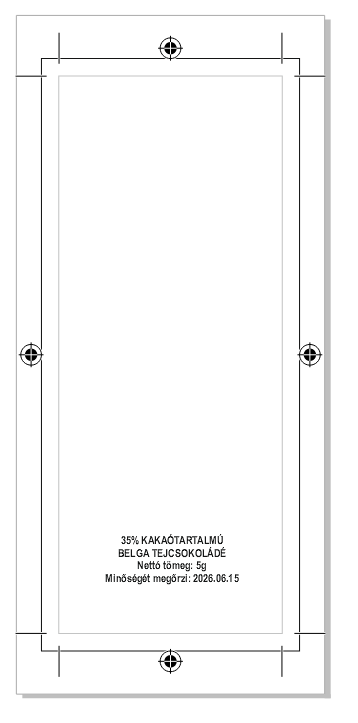
Positioning Guide
- Main artwork: Position the logo and main text in the geometric centre of the dieline so that they are precisely centred after folding.
- Required elements: The lower third is reserved for the expiry date, ingredients and barcode. Please do not place important design elements in this area.
- Bleed: Always extend the background colour or pattern to the outermost dieline so that no white edge remains along the packaging after cutting.
Vector format
For an accurate visual proof and production, please embed the logo in vector format (.pdf, .ai or .eps extension).
Digital printing
If you use a raster image rather than vector artwork for the background, it must have a resolution of at least 300 dpi for a crisp result.
Fonts
Before submitting your artwork, convert all text to outlines or include the custom font files used in the package.
Downloadable dieline templates
Download the accurately sized 5g promotional chocolate template in PDF format.


